
ai
AIAXIO: requirements, how to submit, and what you actually get
Fifteen thousand tools, a three-step form that wants a changelog, and nofollow at the end
aiaxio.com
Eligibility
Who AIAXIO accepts
You need
An account, though Google sign-in is offered
A live URL
A logo at exactly 200x200 and a featured image at exactly 970x545
A version number, a release date and release notes of at least 10 characters
Access to the domain, its DNS or an address on it, to verify ownership after submitting
You'll be rejected if
Nothing is published beyond the tool being an AI tool
AI toolsAI agents
What you actually get
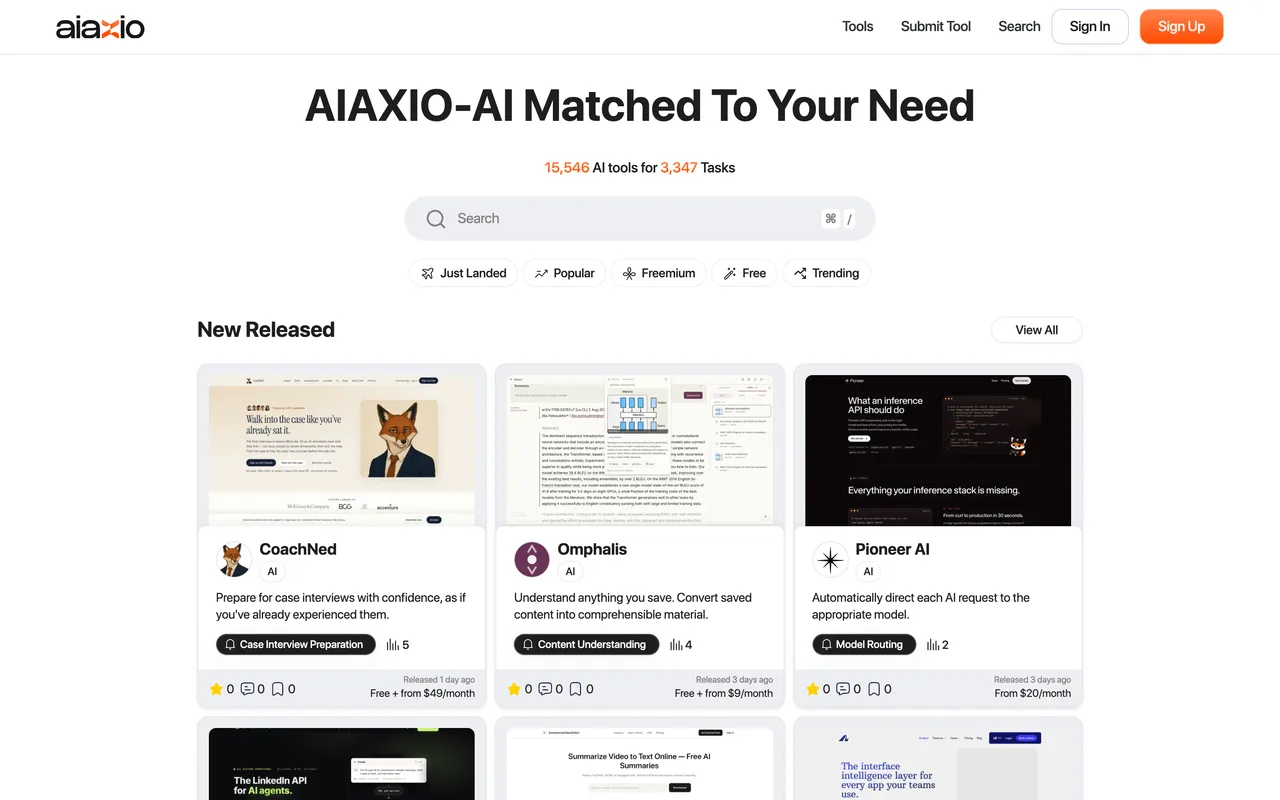
A page at /tools/ai/<slug> with your logo, a featured image, the overview, the description, your input and output types, your pricing tiers and a changelog, inside a catalogue the site puts at 15,546 tools across 3,347 tasks. It is the most detailed listing shape in this band. The link is not: every outbound anchor on a tool page carries rel="noopener noreferrer nofollow external", including the View Site button, so nothing here passes equity. Treat the traffic claims with care: the submit page's own stat blocks render as 0K+ daily page views and 0M+ monthly visitors.
How to submit to AIAXIO
- Sign in with Google, then skip the wizard/submit/add-tool/ bounces to /signin/, which offers email and password or Sign In With Google. Google lands you on /setup/, a personalisation screen asking for at least five interests out of 30,237 subtasks. It has a Skip button.
- Step 1, the product and its changelogTool name capped at 50, a platform URL, an overview capped at 150, a description capped at 5,000 in a rich editor, at least one input type and one output type from a fixed ten, pricing tiers, and a release block wanting a version number, a DD-MM-YYYY date and release notes.
- Step 2, media and taxonomyA logo at exactly 200x200 and a featured image at exactly 970x545, then tool type, a primary task, subtasks you can create if none fits, at least one key feature and target users.
- Step 3, optional extrasVideo URL, pros, cons, questions and answers, social links and team members, all optional. The button underneath is Submit and Verify Tool Ownership.
- Prove you own the domainSubmitting succeeds and immediately opens a dialog offering email verification, a DNS record, or an aiaxio.txt file carrying a JWT at your site's root. The listing is submitted either way; verification is what claims it.
- Track it on My AI ToolsThe account menu leads to a My AI Tools view holding the listing with a live Status (pending until they approve), a completion meter, and per-tool buttons for analytics, ownership verification and delete. The verify dialog covers the page when it opens, so it is easy to finish a submission without ever seeing this screen.
AIAXIO requirements
Tool name
50 characters
Website URL
Overview
150 characters
Description
up to 5,000 characters
Input and output types
1 to 6 each, from a fixed ten
Logo
exactly 200x200
Featured image
exactly 970x545
Version number
e.g. 1.0
Release date
DD-MM-YYYY
Release notes
at least 10 characters
Key features
1 to 10
Ownership proof
an email at the domain, DNS or aiaxio.txt
Gotchas
It wants a changelog you may not have. The release block enforces a version number, a valid DD-MM-YYYY date and at least ten characters of release notes, and the form will not leave step 1 without all three. A product that ships continuously and publishes no version has to decide what to put there.
Both images are exact, not maximum. The logo must be 200x200 and the featured image 970x545, and anything else is refused rather than resized.
Submitting is not the last step. A Verify Tool Ownership dialog opens straight afterwards offering three routes: an email at the domain, a DNS record, or a file called aiaxio.txt holding a JWT at your site's root. Only the email route needs nothing but an inbox; the other two need the domain or its DNS. The dialog also covers the dashboard, so it is easy to miss that the listing already exists and is sitting at pending.
The numbers it recruits you with do not add up. The submit page's stat blocks render as 0K+ daily page views, 0K searches today, 0M+ monthly visitors and 0M+ newsletter subscribers, while the paragraph beside them claims over 10,000 monthly visitors, and its three testimonials are signed John Doe, Sarah Parker and Michael Johnson.
Let your agent submit to AIAXIO
Connect SubmitMap to your AI over MCP and this page stops being something you read and copy. Your agent asks for the AIAXIO playbook and gets the brief for this exact form, with the values already taken from your submission pack instead of placeholders you fill in by hand.
What it does for this platform
Checks your product against the 6 AIAXIO rules above, so you find out you would be rejected before you open a tab.
Hands your agent all 12 fields this form asks for, none of them optional, already filled from your pack.
Types it into AIAXIO in your own browser, and stops for you when the form wants a sign-in.
Records what it sent, so the dashboard can answer "did I ever submit to AIAXIO?".
Connect your agentHow this worksTools and endpointsWorks with Claude Code, Claude, Codex, Cursor, VS Code and Hermes.
AIAXIO FAQ
How long does AIAXIO approval take?
AIAXIO does not publish how long approval takes.
How much does it cost to submit to AIAXIO?
Submitting to AIAXIO is free.
Does AIAXIO give a dofollow backlink?
No, links from AIAXIO are nofollow. The site has a domain rating of 2.
Does AIAXIO require a backlink to your site?
No, AIAXIO does not require a link back from your site.
What gets you rejected from AIAXIO?
Nothing is published beyond the tool being an AI tool.