
dev · community · indie
Vibe Apps: requirements, how to submit, and what you actually get
No account, markdown in the description, and hackathon tags on the shelf
vibeapps.dev
Eligibility
Who Vibe Apps accepts
You need
A live public URL
A name to submit under
You'll be rejected if
The audience is builders showing work, so a product with nothing to show technically is off-tone rather than refused.
Developer toolsIndie productsAI toolsWeb apps
What you actually get
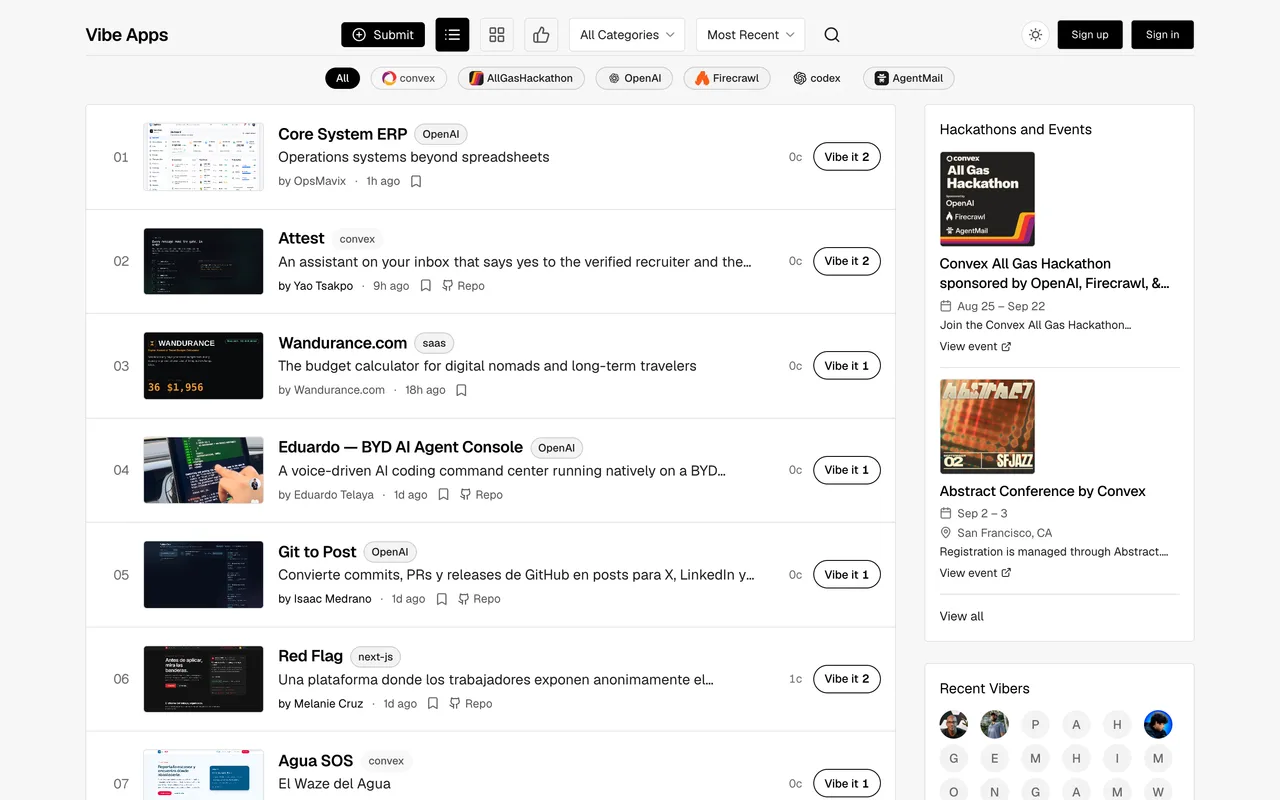
A page in a community for people showing off what they have built, with the tag list running to hackathon and tooling names like convex, OpenAI, Firecrawl and codex rather than to market categories. The form is one of the most generous in this queue: no account, markdown with fenced code blocks in the description, a screenshot plus four more images, and video, GitHub, LinkedIn and X links. Link value is unverified.
How to submit to Vibe Apps
- Open the formhttps://vibeapps.dev/submit renders and fills with no account at all.
- Write the long descriptionThe placeholder asks for the problem, how it works, notable features, why you built it, the tech stack, challenges and any metrics. Markdown and fenced code blocks are supported.
- Add the mediaA screenshot, up to four more images, and a video demo they describe as recommended.
- Tag itTags are searchable and you can create a new one from the same control.
Vibe Apps requirements
A live public URL
An app title
Tagline
140 characters
Description
Markdown with fenced code blocks
Screenshotoptional
Recommended, plus up to 4 more images
Video demooptional
YouTube or Vimeo, recommended
Gotchas
The description placeholder asks for seven specific things including challenges and metrics, so a pack's standard blurb reads as thin against what the form expects.
The tag control lets you create new tags, so it is easy to invent one nobody browses instead of joining an existing shelf.
The shelf is organised around hackathons and build tooling, so a polished commercial product sits oddly among work-in-progress projects.
Let your agent submit to Vibe Apps
Connect SubmitMap to your AI over MCP and this page stops being something you read and copy. Your agent asks for the Vibe Apps playbook and gets the brief for this exact form, with the values already taken from your submission pack instead of placeholders you fill in by hand.
What it does for this platform
Checks your product against the 3 Vibe Apps rules above, so you find out you would be rejected before you open a tab.
Hands your agent all 6 fields this form asks for, 2 of them optional, already filled from your pack.
Types it into Vibe Apps in your own browser, and stops for you when the form wants a sign-in.
Records what it sent, so the dashboard can answer "did I ever submit to Vibe Apps?".
Connect your agentHow this worksTools and endpointsWorks with Claude Code, Claude, Codex, Cursor, VS Code and Hermes.
Vibe Apps FAQ
How long does Vibe Apps approval take?
Vibe Apps does not publish how long approval takes.
How much does it cost to submit to Vibe Apps?
Submitting to Vibe Apps is free.
Does Vibe Apps give a dofollow backlink?
No, links from Vibe Apps are nofollow. The site has a domain rating of 26.
Does Vibe Apps require a backlink to your site?
No, Vibe Apps does not require a link back from your site.
What gets you rejected from Vibe Apps?
The audience is builders showing work, so a product with nothing to show technically is off-tone rather than refused.